Trading Robots for MetaTrader 4
Shopping cart
MetaTrader 4
Top Rated Products MT4



Overview
The advisor's trading strategy is based on the assumption that after the price reaches an overbought or oversold level, it usually rolls back. In other words, the price cannot move in only one direction, since any action generates a reaction.
If the market reverses against the open position, the advisor uses loss recovery through averaging orders. This allows you to continue trading even if the previous transaction became unprofitable.
The advisor trades on a real account, to learn more, visit my profile , or write in private messages.
The price of the Expert Advisor will change on a monthly basis. The price will depend on the annual return that the Expert Advisor has shown on the live account. The calculation will take into account the return on 100 invested dollars.
As of April 20, the return on investment in this Expert Advisor was $ 215 for every $ 100 invested over 224 days. The EA price is expected to change in mid-May.
The results of backtesting and real trading are very similar. This allows me to trust the backtesting results and create the best setups for trading on a real account.
I think the advisor has great potential. However, testing and adjusting the settings takes a lot of time. I think we could save a lot of time if we tested it together. If you agree, I will be glad to see you in the list of advisor users.
Description of variables:
** General ** – settings used for both initial and averaging orders. The magic number – the magic number of the order. It is used as a user-defined identifier. By this number, the advisor finds its orders that it is allowed to work with.
The magic number is an individual number for orders placed by the advisor.
Spread (maximum allowed) - the maximum spread size allowed for placing orders by the advisor.
StopLoss (point) – the size of the stop loss for each order placed by the advisor.
UseIndicator – select an indicator for the advisor to work with from the suggested ones:
- PointZigZag – the “Point Zig Zag” indicator is used. The indicator needs to be installed in the terminal. To test the advisor, it is enough to install the demo version of the “ PointZigZag ” indicator.
Attention! After installing the i_PointZigZag indicator, check the installation location: MQL4 > Indicators > Market > Point Zig Zag.ex4 - ZigZag – the standard indicator “Zig Zag” is used with settings from the variable “Depth (for i_ZigZag)”.
Ratio Trend/Pullback = – the ratio of the expected trend size to the value of the “Minimum Pullback Size (point)” parameter. This is used to determine the size of the current trend to begin with.
Minimum ZigZag segment size (point) – Estimated Minimum size of the extreme ZigZag segment (in point).
Depth (for i_ZigZag) – setting of the standard indicator “Zig Zag".
** Startup ** – settings used for initial orders.
Terminal/Trade/No orders – selection (true/false). Setting initial (starting) orders is allowed only if there are no open or pending orders in the terminal.
Probability of a successful entry - The probability of a successful entry into the market is the probability that a correction in the market will lead to a profitable trade. The higher the probability, the greater the chance of a successful entry. If the probability is equal to one, this means that the chances of success are minimal.
Noise_Size (point) - Noise size (noise level) in points is a parameter used to enter the market.
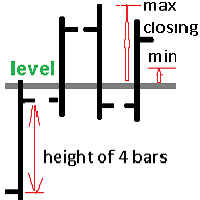
MomentumBack_SizeMin(point) – minimum size (in points) of the reverse impulse for the initial order.
MomentumBack_SizeMax(point) – maximum size (in points) of the reverse impulse for the initial order.
UseForStart - select a strategy for starting:
- (#1)With a Line - trading using trend lines.
- Red line intended for sales transactions;
- Blue line intended for purchase transactions.
When the market price reaches these lines, it becomes the first signal to start trading. After that, when all the conditions set in the algorithm are met, the adviser will automatically open the first transaction.
- (#2)Without a Line - trading without lines.
TrendLine_2ndPoint - only if " UseForStart = (#1)With a Line " is used:
- BestExtremumPrice - the best extreme price;
- NearestExtreme - the nearest extremum.
Correction of the indicator – choice (true/false). The setting works only if "UseIndicator == PointZigZag". Takes into account possible redrawing of the indicator.
startHOUR, startMINUTE, stopHOUR, stopMINUTE – time allowed for placing initial (starting) orders.
Lot size (for the starting order) – the desired volume for the initial (starting) order.
Risk in %(for the starting order) - if the value is 0, the variable is not used. If the value is greater than 0 (zero), the initial (starting) lot will be automatically calculated in the specified percentage of available funds.
TakeProfit (point) – profit level for the initial (starting) order. If the value is 0 (zero), the [tp] level is not set.
** Averaging ** - settings used to recover losses using averaging positions.
MomentumBackAv_SizeMin(point) – minimum size (in points) of the reverse impulse, for averaging positions.
MomentumBackAv_SizeMax(point) – maximum size (in points) of the reverse impulse, for averaging positions.
Distance (for Grid_Average) – minimum distance for placing averaging orders.
Martin (only for Series) – coefficient of volume increase during averaging.
Number of orders in the series(only for Series) – desired number of orders in the series
TakeProfit (for Grid_Average) – TakeProfit value in points for averaging orders.
MaxLot (for Grid_Average) – the maximum allowed lot size value for averaging.
** Closing ** - settings for automatic closing of positions by the advisor.
Automatic closing of positions - choice:
- NotClose_Avto - automatic closing of positions by the advisor is not used.
- UsedClose_Avto - automatic closing of positions by the advisor is used.
Target is money (if there is more than one position in the Cycle) - the minimum target in money for permission to automatically close positions.
** Display **
Display RIGHT_UPPER information – select (true/false) to show information about the settings on the chart (upper-right corner).
Display RIGHT_LOWER information – select (true/false) to show additional information on the chart (lower-right corner)
** Buttons ** – purpose of the buttons located in the lower right corner of the chart.
All buttons are relevant both for testing in the tester and for trading in the terminal.
" op_SELL "
– opening only the initial order for Sell. The lot size, stop-loss and take-profit levels are used from the settings (Startup). The button is active when it is green, and the button is inactive when it is red.
Note: When the button is red, it is pressed, but the order is not opened.
" op_BUY "
– opening only the initial Buy order. The lot size, stop-loss and take-profit levels are used from the settings (Startup). The button is active when it is green, and the button is inactive when it is red.
Note: When the button is red, it is pressed, but the order is not opened.
" Close All "
– closes all open orders of this EA on this instrument and stops the EA operation.
" EA is ON / OFF "
– starting and stopping the EA operation.
The button is green and has the inscription “ EA is ON ” – EA is working.
The button is red and the inscription “ EA is OFF ” – EA is turned off.