Trading Robots for MetaTrader 4
Shopping cart
The cart is empty
MetaTrader 4
Top Rated Products MT4



Overview
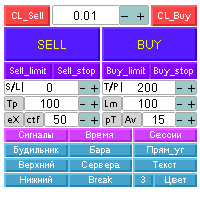
The Expert Advisor trades using the Stochastic indicator with the specified parameters. A trade is opened at the crossover of the specified levels. The default levels are K = 11, D = 3, Sl = 3. The EA opens a trade when overbought and oversold levels specified by the trader are crossed. Trades are closed by Take Profit levels, which are hidden form the broker. If a wrong direction is chosen, the EA opens an averaging grid of orders.
Expert parameters
- MAGICB - Long magic number;
- MAGICS - Short magic number;
- "__Working hours__GMT__";
- Hours_to_GMT_Offset - broker time zone shift from GMT.
- Hours - configure operation in the specified hours or let the EA trade round the clock;
- Begin_hour - GMT time for the EA to start operation;
- End_hour - the end hour for the EA to automatically place initial trades. However, the EA will still be able to manage open positions.
- "__Start__";
- Net - enable/disable the use of the averaging grid;
- Info - show/hide information about possible presence of a trend;
- GameOn - enable program operation or reset the EA;
- Deals - the number of initial trades at a time;
- NumbLot - the number of decimal places for the lot value (when the EA is used for operations with CFDs);
- MaximumRisk- maximum allowable risk percent;
- DecreaseFactor - lot decrease ratio in case of unsuccessful trade series;
- KST- parameter of the Stochastic indicator;
- DST- parameter of the Stochastic indicator;
- SlSt - parameter of the Stochastic indicator;
- StLevelDn - the oversold level;
- StLevelUp - the overbought level;
- TP - Take Profit;
- SLPLUS - Stop Loss;
- ProfStop - virtual Take Profit in the deposit currency;
- СoefLot - lot multiplier for the averaging grid;
- MinPauseNetUp - interval between UP trades in minutes;
- MinPauseNetDn - interval between DN trades in minutes;
- StopDeals - the number of stop loss modifications for Trailing Stop;
- Step - averaging step, 2 - aggressive and fast events in the averaging grid, 250 - not very aggressive and long-term events;
- Net - enable/disable the use of the averaging grid;
- OnOffUnLine - enable/disable the use of an uneven step in the grid;
- ULсoef - step multiplier;
- Slippage - allowable slippage;
- Invers - inversion of trading direction, if true - opposite direction;
- "__Directions On/Off.__";
- SELL- allow opening Short trades;
- BUY - allow opening Long trades;
- "__Trailingator__" - Trailing Stop parameters;
- TrailingStop = 3;
- TrailingStep = 6;
- DelObj - removal of objects from the screen after unloading the EA.
The default parameters are given for EURUSD H1.